Deploy yourgame.
Publish a web build with the Vapour CLI, test it in the browser, and share it with your players.
Your engine. Your next audience.
Publish a web export from your favorite engine or framework.
 GodotWeb export
 UnityWeb build
 BevyRust / WebAssembly
 EmscriptenC & C++ / WebAssembly
 raylibC / Web export
 DefoldHTML5 export
 PhaserJavaScript / Web
 PlayCanvasWeb-native games
 GameMakerHTML5 export
 Three.jsJavaScript / WebGL
Build. Publish. Share.
A clear path from your first web export to your next player.
From your build
to a playable link.
A few commands between your next idea and your next player.
Install the CLI
Run the install script on macOS or Linux. On Windows, use
go installor a release archive (see the docs).Connect your account
Create an API token in your developer dashboard.
Bring your web build
Export to
build/web/with anindex.html.Publish your game
Run
vapour publishto upload your build.
curl -fsSL https://raw.githubusercontent.com/vapour-computer/vapour-cli/main/install.sh | sh
vapour login --token YOUR_TOKEN
vapour create "My Game" --engine godot
cd my-game
# Export your game for Web into build/web/ (needs an index.html)
vapour publishReplace YOUR_TOKEN with your API token before running these commands.
01 · Build
Export your game for the web, then set up your project with the Vapour CLI. Declare the controls and browser features your game needs.
02 · Publish
Upload your build with vapour publish. Test the browser experience and use profiling tools to investigate load times, frame rate, and errors.
03 · Share
Complete review and share your live game page. Players can discover your game, check its controls, and open it in their browser.
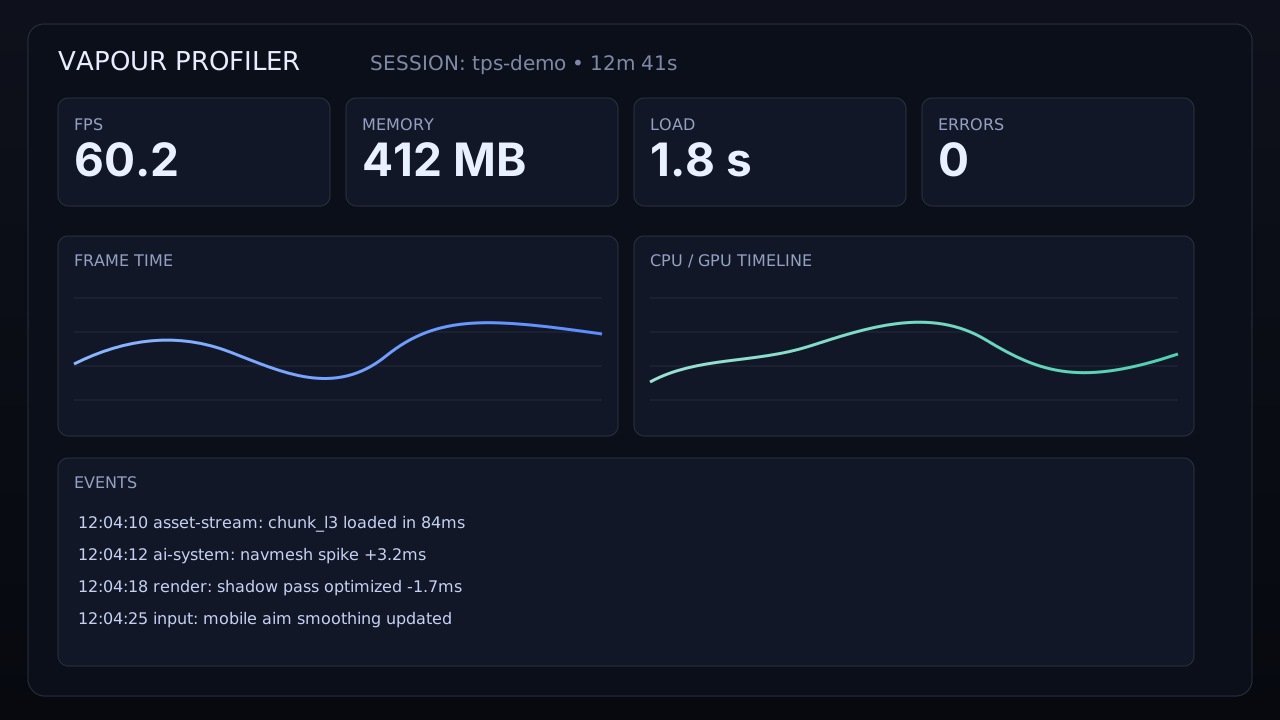
Your game, under the microscope.
See what players actually feel: frame spikes, memory pressure, load hitches and error bursts. Tune the game, push a new CLI build, and feel the difference instantly.